Self-hosted customer support · Sold as source code
One support inboxfor all your brands.
Website chat, email and messaging for every brand or product land in one inbox your team runs on your own server. Workspaces keep each brand’s channels, people and customers apart.
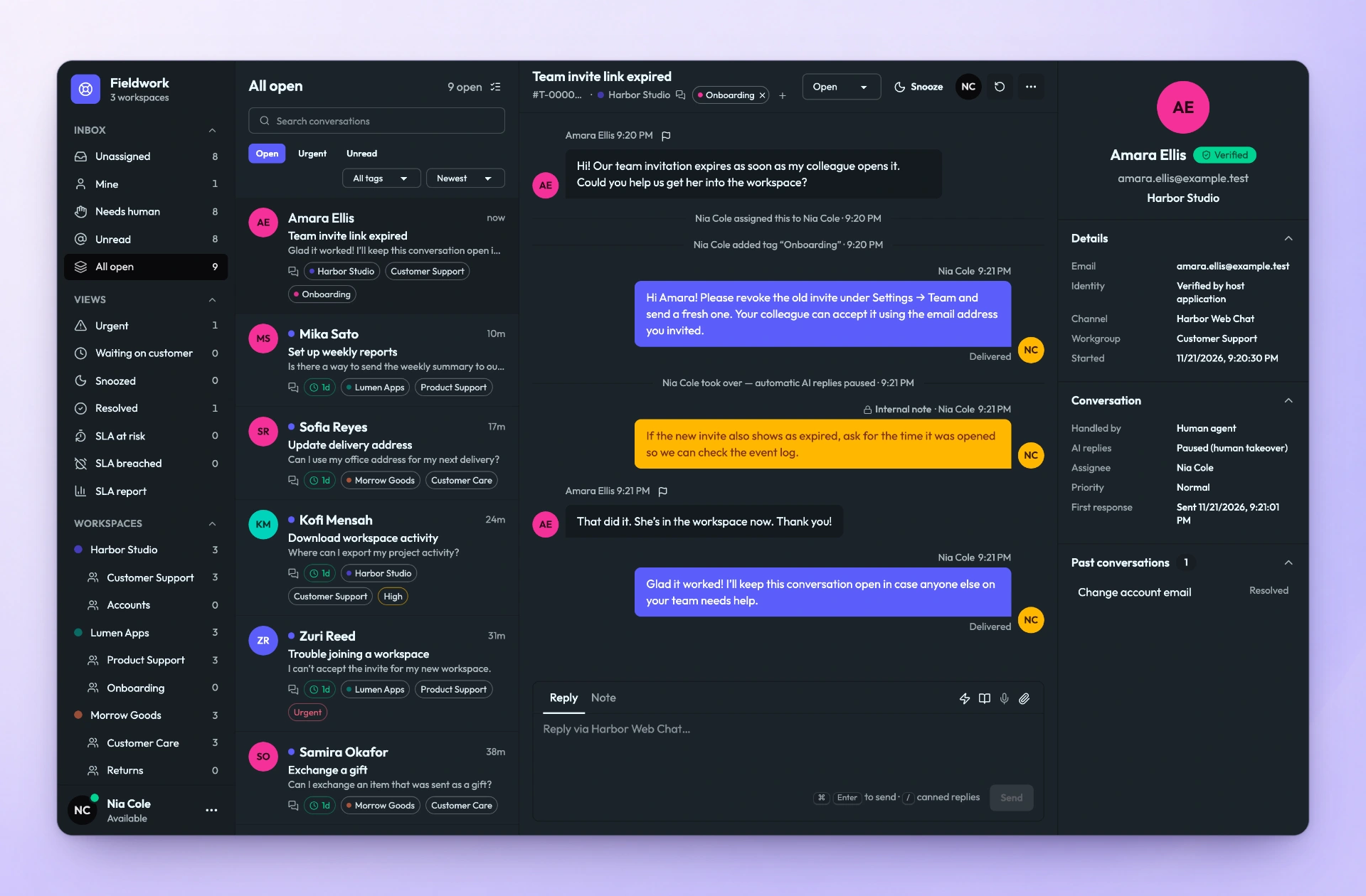
Brand queues
Each workspace and its workgroups sit in the sidebar, with counts, next to shared views like Needs human and SLA at risk.
Private note
Staff discuss the case in the thread. Notes stay on your server and never reach the customer.
Verified customer
Identity, channel, workgroup and past conversations sit beside the reply.
01 / Unified inbox
Every channel, every brand. One place to answer.
Staff see the queues of the workgroups they belong to, reply on the channel the customer used, and keep the working conversation private.
Private notes in the thread
Notes sit beside replies, so context stays with the conversation. They are never sent to customers, channels, the public API, webhooks or AI providers.
Queues that stay honest
Assign, tag, snooze and prioritise. Views for Unassigned, Needs human, SLA at risk and SLA breached show what needs a person next.
Knowledge and optional AI
Connect your own AI provider. Copilot drafts replies for staff to check. Autopilot answers only from a matching published article and hands everything else to people.
Customers you can trust
A signed identity from your backend marks a customer as verified, so they continue their latest open conversation from your website, WordPress or app.
Channels
- Web Chat
- Email (IMAP/SMTP or Resend)
- Telegram
- WhatsApp Business Platform
- Messenger
- Twilio Voice
- TikTok Business Messaging
Each provider has its own account and approval requirements. Channel setup
02 / Multi-brand workspaces
Many brands, one organization. Clear lines between them.
One installation belongs to one organization and holds a workspace for each brand or product. Each workspace owns its channels, workgroups, customers, Knowledge, AI settings and chat theme. Agents only see the workgroups they belong to.

- Separate by default. Channels, workgroups and customer records belong to one workspace.
- Shared where it helps. One WhatsApp number or Telegram bot can serve several brands, using routing codes, earlier conversations or a “which brand?” question.
- One inbox for staff. People who work across brands see all their queues together.
03 / Web chat
Chat on your site. The same ticket on every screen.
One script tag adds a branded chat, served by your installation in an isolated frame. On a phone it opens full screen, and verified customers pick up their latest open conversation wherever they return.
- Chat colours published per brand
- Customers can request a callback on the ticket. Staff follow up; nothing dials automatically.
- A WordPress plugin, app WebViews and a React Native SDK use the same channel
<script async
  src="https://support.example.com/widget/loader.js"
  data-site-key="pk_…"></script>
04 / Self-hosting
Your server. Your data. Your source code.
KasaDESK is sold as source code and runs on infrastructure you control. The vendor does not operate your installation, and nothing leaves your server unless you connect it.
- Runs on
- A Linux host with Docker Engine and Compose
- Database
- PostgreSQL, run for you by the supplied Compose file
- Plan for
- At least 2 vCPU, 4 GB RAM and 40 GB disk, plus backup storage
- Sign-in
- Owners, admins and supervisors always use an authenticator app (TOTP)
- Backups
- Checksummed database and attachment backups, daily and weekly copies, optional S3-compatible off-site copies
- Upgrades
- Back up, build or pull the new image, start it. Migrations run before the app starts
- Data that leaves
- Only what you connect: channel providers, your AI provider, browser push if enabled, and your backup storage
# Start the stack
docker compose --env-file deploy/.env \
  -f deploy/docker-compose.yml up -d --build --wait

# Check liveness and readiness
curl -fsS https://support.example.com/healthz
curl -fsS https://support.example.com/readyz

# Single-use code for the owner account at /setup
docker compose --env-file deploy/.env \
  -f deploy/docker-compose.yml exec app \
node dist/cli.js bootstrap-token05 / Buyer questions
Before you talk to sales.
Short answers for teams evaluating KasaDESK.
All frequently asked questionsHow is KasaDESK sold?
As source code that you deploy and run on your own infrastructure. Pricing for your organization, licence terms and the source-code package are handled by a person on the sales team. Choose Chat with us and ask for sales.
Who hosts KasaDESK?
You do. You run it on your own server or cloud account and keep your data there. The vendor does not operate your installation.
Can one installation support several brands or products?
Yes. One installation belongs to one organization and holds a workspace per brand or product, each with its own channels, workgroups, customers, Knowledge, AI settings and chat theme. Staff see the queues they belong to in one combined inbox.
Does KasaDESK include AI?
Optionally. You connect your own provider: OpenAI-compatible servers, Anthropic, OpenRouter, DeepSeek or Google Gemini. Autopilot answers customers only when a published Knowledge article in the same brand matches.
Do customers ever see internal notes?
No. Notes stay on the server and are never sent to customers, channels, the public API, webhooks or AI providers.
Is there a staff phone app?
A shared KasaDESK staff app for iOS and Android is planned. Store availability has not been announced. Today, staff use the web console in any modern browser and can install it as a desktop app.
Can I add support chat to my own mobile app?
Yes. Load a Help Center page you host into a WebView, or use the React Native customer SDK. Both use the same Web Chat channel as your website.